Ever looked at your access logs and wondered how much of that traffic is actually people? These days a good chunk of it is crawlers, AI agents and scrapers, and they don’t all deserve the same treatment. Googlebot should get in. A training crawler maybe should pay. A script pretending to be Chrome while it walks through every product ID shouldn’t get in at all.
The tools that can tell those apart mostly live at a CDN, which means your traffic goes through someone else’s network and you get a score you can’t explain. So I built SieveGate: a self-hosted reverse proxy that classifies every request, tells you why, applies your policy, and can ask automated clients to pay through HTTP 402.
When I looked at what’s out there, the options split into two groups:
- Commercial bot management: genuinely good, but opaque. You get a number from 1 to 99, your traffic has to go through their network, and the interesting features sit behind enterprise plans
- Open-source tools: IP blocklists, additive “bad points” scores, or proof-of-work walls that make every visitor solve a puzzle. Solving those puzzles at scale costs a scraper next to nothing
Verified identity is mostly missing, anyone can put Googlebot in a User-Agent. Checking the claim against Google’s published IP ranges or reverse DNS is easy, but few self-hosted tools do it. Also, nobody answers with 402, or at least I couldn’t find an open-source proxy that verifies Web Bot Auth signatures or returns a machine-readable HTTP 402 to a crawler. I wanted something in between: commercial-grade signals, every decision explained, running on my own box.
What It Does
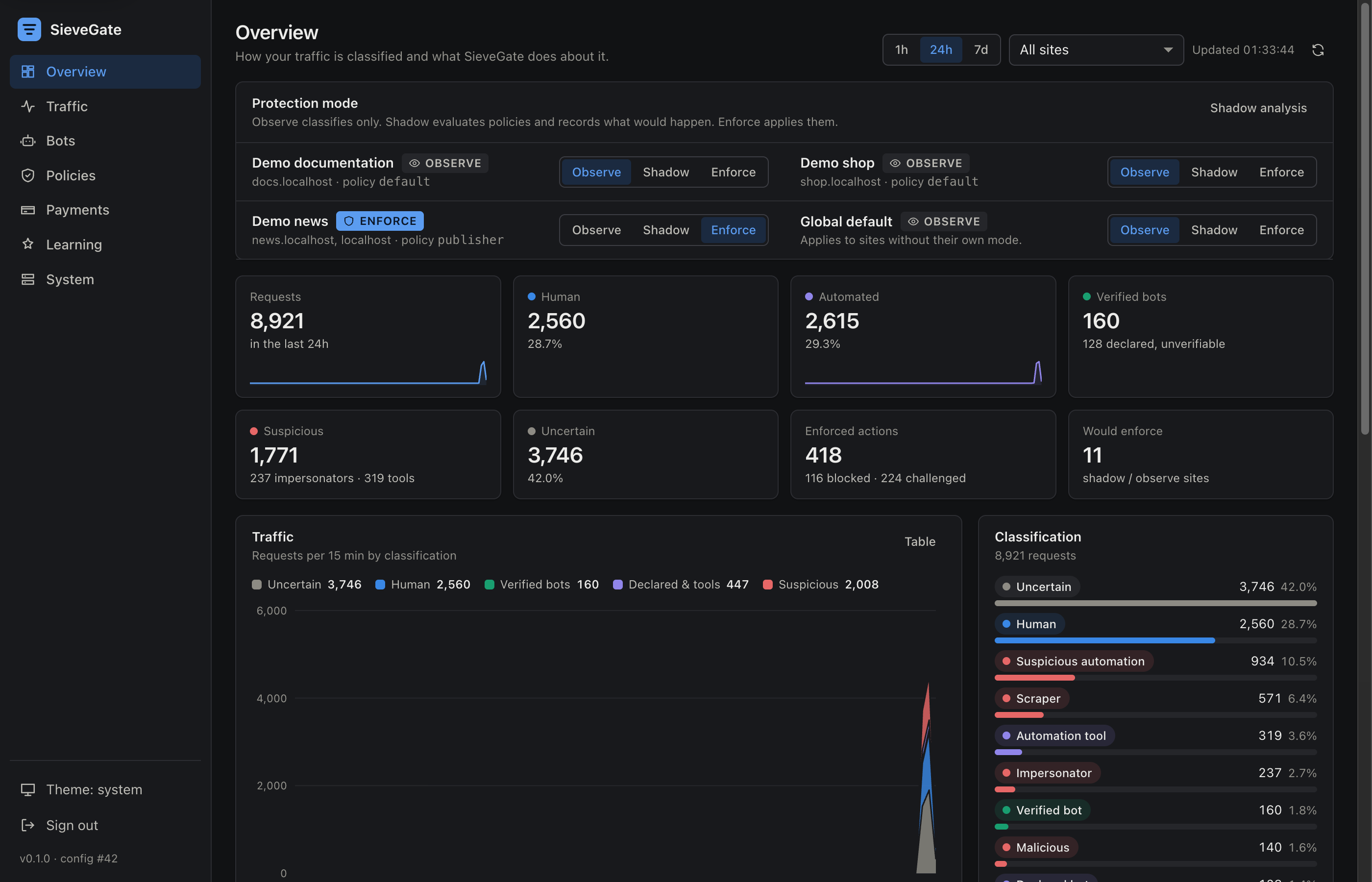
SieveGate sits in front of one or more sites (Internet → SieveGate → your origins) and, for every request, works out:
- What it is: human, verified bot, declared bot, impersonator, HTTP tool, headless browser, scraper or malicious automation, plus an explicit uncertain that the default policies never act on
- How sure it is: separate scores for automation, maliciousness, scraping, anomaly, identity and reputation, and a confidence that drops when the evidence is thin or contradicts itself
- Who it claims to be, and whether that checks out: 100 crawler definitions, verified through published IP ranges, forward-confirmed reverse DNS, or Web Bot Auth Ed25519 signatures. A claim that fails verification is itself strong evidence
- Whether the layers agree: a Chrome User-Agent should come with a Chrome TLS handshake (JA4), client hints and fetch metadata. Libraries pretending to be browsers usually get one of those wrong
- How it behaves over time: page rate against the site’s own baseline, machine-regular timing, ID enumeration, pages without CSS/JS/images, dropped cookies, and fleets of IPs that share one exact client signature
Then your policy decides what happens: allow, rate limit, challenge, block, or 402 Payment Required. Every site runs in observe mode first (classify only), then shadow (record what would happen), and only then enforce. You can switch modes without restarting anything, and Replay runs a draft rule set against last week’s stored traffic before you turn it on.
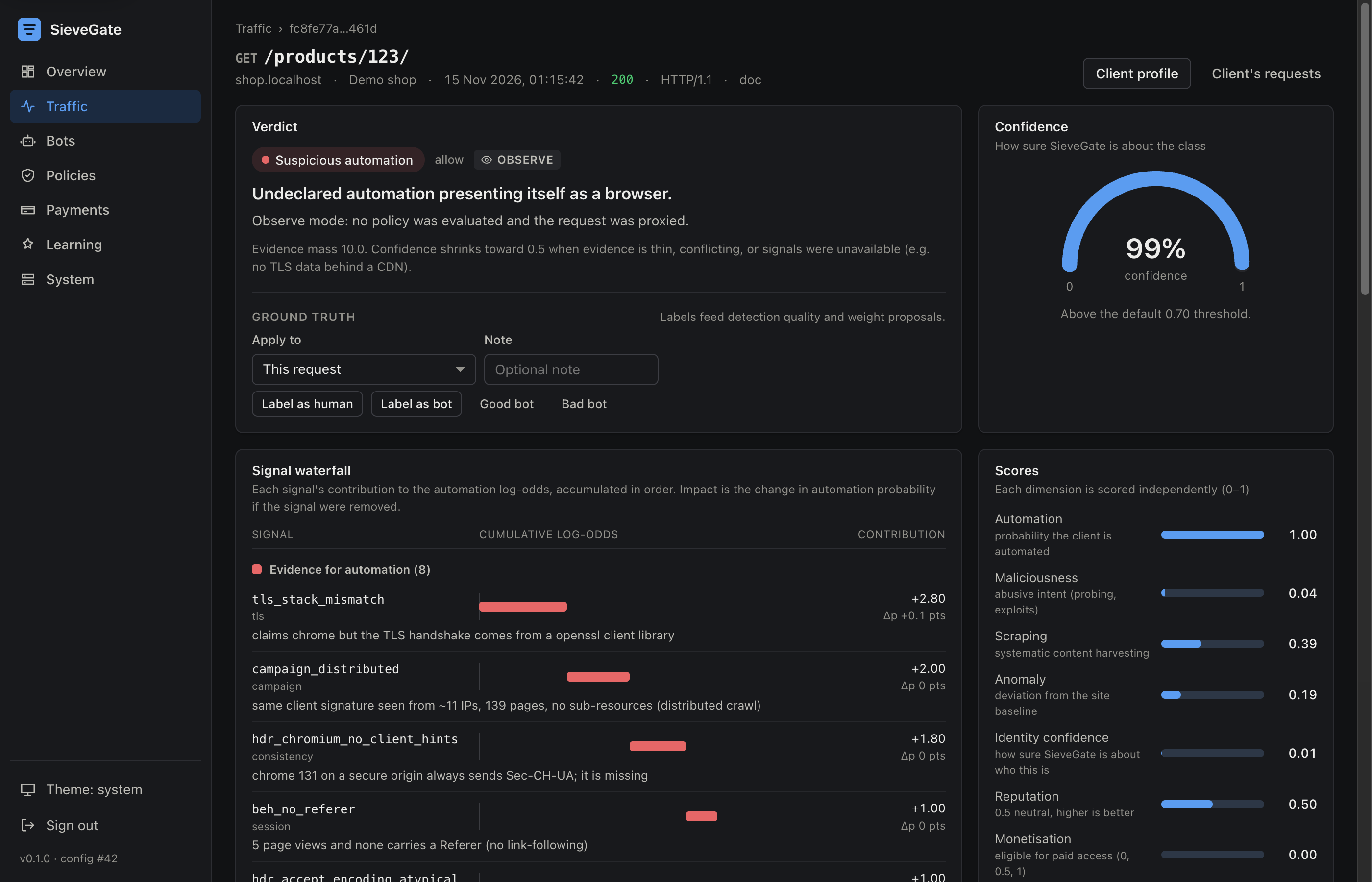
And every decision comes with its reasons:
Charging AI Crawlers
This is the part I find most interesting. A publisher’s policy can look like this:
- id: allow-verified-search
  when: { bot.verified: true, bot.category: [search_engine] }
  action: allow
- id: block-impersonators
  when: { classification: bot_impersonator }
  action: block
- id: charge-ai-crawlers
  when: { bot.category: [ai_crawler, ai_search], path: "/articles/**" }
  action: { type: payment_required, offers: [article, day-pass] }
The crawler gets a 402 with an x402 offer (v2 header, v1 body, so old and new clients both understand it). It signs a USDC authorization and retries, SieveGate settles it through a facilitator before serving anything, and the response carries a scoped access token. One payment can buy one article or a whole day of the site, so nobody pays per request.
The subtle bit is replay protection. The facilitator’s /verify doesn’t reserve anything, so two requests with the same signed payment would both look valid. SieveGate reserves each authorization twice, in the proxy’s shared memory and under a database unique constraint, before it ever calls the facilitator. SieveGate never holds a private key: you only give it the address that receives the money.
How It Works Under the Hood
The data plane is OpenResty (nginx + LuaJIT), so detection runs inside the proxy in microseconds instead of calling out to a service. A small Python control plane does configuration, analytics, the dashboard and payments. There’s no Redis or Postgres: shared memory and SQLite cover a single server comfortably.
1. The JA4 That OpenSSL Hides
OpenResty lets you read the TLS ClientHello from Lua, so computing JA4 looked easy. Then I compared what OpenSSL reported against the raw bytes on the wire, and Chrome’s handshake was missing three extensions. Firefox’s was missing three too. OpenSSL silently drops any extension it doesn’t implement itself, so the JA4 for every current Chrome and Firefox came out wrong.
The fix is a little trick: register those extension types as “custom” server extensions whose callback declines to send anything back. OpenSSL then records them, and the handshake doesn’t change:
local decline = ffi.cast("sg_custom_ext_add_cb", function() return 0 end)
for _, t in ipairs({ 17513, 17613, 65037, 34, 28 }) do  -- ALPS, ECH, delegated creds...
  if C.SSL_extension_supported(t) == 0 then
    C.SSL_CTX_add_custom_ext(ctx, t, SSL_EXT_CLIENT_HELLO, decline, nil, nil, nil, nil)
  end
end
After that, a Chrome handshake produced exactly the published JA4 for current Chrome, t13d1517h2_8daaf6152771_cb7bf5808d99, on a stock OpenResty image.
2. A Score You Can Read
Each signal adds or subtracts evidence in log-odds, with a short explanation attached (“claims Chrome but the TLS handshake comes from an OpenSSL client library”). Signals that measure the same thing are grouped so they can’t pile up: five header rules tripped by one sloppy scraper count for about twice the strongest one, not five times. If the evidence is thin, the answer is uncertain, and by default uncertain means “let it through”.
Try It Right Now
It’s one Docker Compose file, with three demo sites included so you can play before pointing it at anything real:
git clone https://github.com/rouralberto/sievegate.git && cd sievegate
docker compose up -d
docker compose logs control | grep "shown once"   # dashboard password
The demo sites are on http://localhost:8080 (as docs.localhost, shop.localhost and news.localhost) and the dashboard is on http://127.0.0.1:9090. To protect a real site, add it to config/sievegate.yaml with its hosts and origin, and leave it in observe mode for a few days.